Qu'est-ce qu'un dressing numérique ?
Un catalogue mobile de tous vos vêtements pour planifier vos tenues, éviter les doublons et porter ce que vous possédez vraiment.
En une phrase
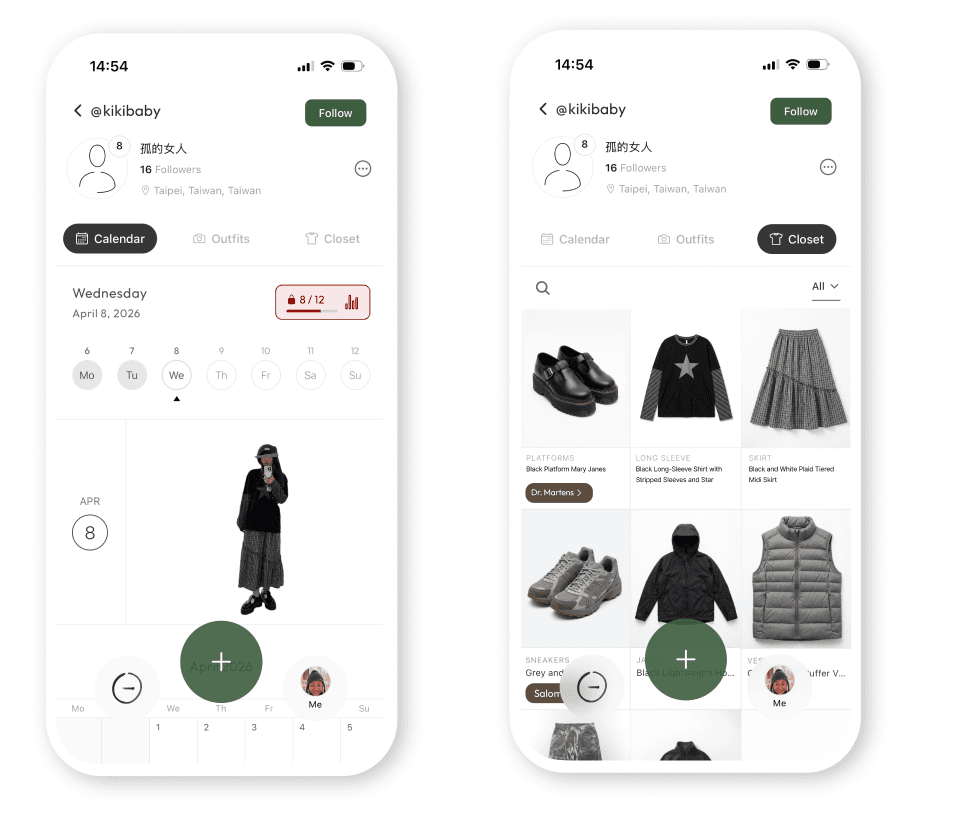
Un dressing numérique (ou garde-robe virtuelle) est une application qui stocke les photos de vos vêtements, chaussures et accessoires. Parcourez votre garde-robe comme un catalogue, créez des tenues et suivez ce que vous portez, sans ouvrir votre placard.
Pourquoi avoir un dressing numérique
Arrêtez de racheter ce que vous possédez déjà
La plupart des gens redécouvrent environ un tiers de leur garde-robe dès la première semaine. Le moyen le plus rapide de réduire vos dépenses est de voir ce que vous avez déjà.
Préparez vos tenues la veille
Ouvrez votre calendrier, glissez un haut sur un bas, enregistrez. Fini la panique vestimentaire de 7h du matin.
Calculez votre coût par port
Suivez la rentabilité de vos articles. Des bottes à 300 € portées chaque semaine coûtent moins cher que celles à 80 € portées deux fois.
Préparez vos valises n'importe où
Créez des lookbooks de voyage depuis votre téléphone : au bureau, dans le train, partout sauf devant une valise ouverte.
Comment commencer
Environ cinq minutes pour enregistrer vos favoris. Pas besoin de tout faire d'un coup.
Photographier ou importer
Dans la plupart des apps, vous shootez chaque article un par un. Lekondo prend un raccourci : prenez une seule photo de votre tenue et le modèle détecte chaque article instantanément.
Taguez une seule fois
Couleur, catégorie, saison, matière. La plupart des apps les détectent automatiquement maintenant. Environ cinq secondes par article.
Créez des tenues et suivez vos ports
Glissez les articles ensemble pour sauvegarder des tenues. Appuyez sur une tenue dans votre calendrier pour enregistrer un port. Vos habitudes apparaissent après quelques semaines.
La différence Lekondo
Une photo de tenue. Tout le dressing se crée tout seul.
Toutes les autres apps vous demandent de photographier chaque article individuellement. Haut, pantalon, chaussures, bijoux. La plupart des gens perdent patience après vingt articles et ne finissent jamais.
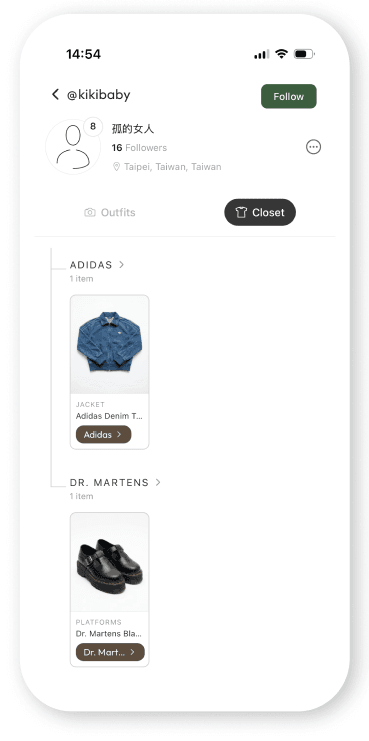
Lekondo choisit une autre voie. Téléchargez une photo de tenue — selfie miroir ou OOTD — et le modèle identifie chaque pièce : haut, bas, chaussures, sac, bijoux. Une seule photo peut générer cinq articles à la fois.
C'est la raison pour laquelle les utilisateurs de Lekondo créent un dressing complet en moins de quinze minutes. C'est aussi pourquoi nous mettons en avant la méthode d'ajout, souvent ignorée par les tests.
Les meilleures apps de dressing numérique en 2026
Nous les avons toutes testées. Aucune app n'est parfaite sur tous les points : choisissez selon vos besoins réels.
| App | Idéal pour | Version gratuite | Ajout d'articles | Social / lookbook | Plateformes |
|---|---|---|---|---|---|
| Lekondo | Création automatique via photos de tenues + lookbook communautaire | Articles illimités | Une photo de tenue → détection de chaque article | Oui | iOS, Android |
| Alta | Tenues par IA + essayage virtuel avec avatars | Gratuit | Reçus, recherche de marque, photos individuelles | Partiel | iOS, Android |
| Whering | Basiques du dressing, forte communauté UK et EU | Articles limités | Photos individuelles, reçus | Partiel | iOS, Android |
| Acloset | Suggestions IA, choix selon la météo | Limité | Photos individuelles | Non | iOS, Android |
| Indyx | Garde-robe capsule + suivi revente | Limité | Photos individuelles, reçus | Non | iOS uniquement |
| Stylebook | Utilisateurs experts voulant des analyses détaillées | 4,99 €, pas de version gratuite | Photos individuelles (manuel) | Non | iOS uniquement |
| Cladwell | Coaching garde-robe capsule | Essai seulement | Catalogue de marques sélectionnées uniquement | Non | iOS, Android |
Questions fréquentes
Existe-t-il une application de dressing numérique gratuite ?
Oui : Lekondo, Alta et Whering proposent des versions gratuites. Celle de Lekondo est illimitée ; Whering limite le nombre d'articles ; Stylebook est payant (4,99 € une seule fois).
Quelle est la différence entre Lekondo et Alta ?
Alta se concentre sur le stylisme IA avec avatar. Lekondo se concentre sur le suivi de ce que vous portez réellement et l'exploration d'un lookbook communautaire mondial. Les deux sont gratuites.
Dois-je photographier chaque article un par un ?
Dans la plupart des apps, oui. Lekondo est l'exception : une seule photo de tenue suffit pour détecter et ajouter chaque article à votre dressing. C'est pour cela que nos utilisateurs vont jusqu'au bout.
Un dressing numérique aide-t-il vraiment à moins dépenser ?
Oui, car vous n'oubliez plus ce que vous possédez. Voir son dressing en dehors de son placard réduit l'impulsion d'achat.
Est-ce la même chose qu'un calendrier OOTD ?
C'est lié. Le dressing stocke vos articles ; le calendrier OOTD enregistre vos tenues quotidiennes. La plupart des apps font les deux : voir notre guide du calendrier OOTD.
Puis-je partager mon dressing avec des amis ?
Cela dépend de l'app. Lekondo, Alta et Whering intègrent le partage. Stylebook et Cladwell sont privées par défaut.
Commencez votre dressing numérique
Gratuit, articles illimités, prêt en cinq minutes.